MAQ vs. TRGS 510 Storage Thresholds: How to Automate Compliance in Chemical Inventory Software
How IFC maximum allowable quantities and TRGS 510 threshold quantities differ, and how a digital chemical inventory keeps every space within its limit automatically.
MAQ or threshold quantity? IFC and TRGS 510 compared
Both concepts cap the quantity of each hazard category in a defined area, but they differ in name, in the area they monitor and in what happens when the limit is exceeded.
| Aspect | IFC (USA and other jurisdictions) | TRGS 510 (Germany) |
|---|---|---|
| Term | Maximum Allowable Quantity (MAQ) | Threshold quantity |
| Area monitored | Control area: a fire-rated compartment, with limits that vary by floor | Enclosed operational building |
| If the limit is exceeded | The building's occupancy classification changes, for example to a high-hazard (Group H) occupancy | Additional protective measures must be put in place |
One tool for both regulations
In the Labcup software the feature is called MAQ, but it is just as suitable for monitoring TRGS 510 threshold quantities. You enter the TRGS threshold as the limit, apply it at building level with a target set, and Labcup tracks it exactly like an IFC MAQ: live totals, warnings before the threshold is reached, compliance reports and alerts. Sites that work under both regulations can run IFC and TRGS rules side by side.
This article uses MAQ as the main term and points out where TRGS 510 works differently.
What is a Maximum Allowable Quantity (MAQ)?
An MAQ is a quantity ceiling for one category of hazardous material inside one defined space. Typical categories are flammable liquids, oxidisers, toxic and highly toxic materials, corrosives, pyrophorics, water-reactives and compressed or cryogenic gases.
The space is usually a control area: a part of a building enclosed by fire-rated walls and floors, inside which hazardous materials may be stored and used up to the MAQ. A building can contain several control areas, but the number allowed per floor is itself limited.
MAQs exist because fire codes design buildings for an expected hazard level. A normal office, classroom or laboratory building (for example IFC/IBC occupancy groups B or E) is built on the assumption that only small amounts of hazardous materials are present. Once the MAQ is exceeded, the space must be treated as a high-hazard occupancy (Group H in the IBC), which demands far more expensive construction, explosion control, ventilation and separation.
In practice, staying under the MAQ is what allows a research building to remain a laboratory building.
Which regulations define MAQs?
MAQ limits come from fire and hazardous-substance codes, and the applicable one depends on your country and your local authority having jurisdiction (AHJ).
| Regulation | Region | What it governs |
|---|---|---|
| International Fire Code (IFC), Chapter 50 | USA and many other jurisdictions | MAQ tables per hazard class and per control area, with floor-level reductions and sprinkler/cabinet increases |
| International Building Code (IBC), Section 307 | USA | When exceeding MAQs triggers a Group H (high-hazard) occupancy |
| NFPA 45 | USA, international reference | Fire protection for laboratories, including flammable-liquid limits per laboratory unit |
| NFPA 400 and NFPA 30 | USA, international reference | Hazardous materials code and flammable/combustible liquids code |
| TRGS 510 | Germany | Storage of hazardous substances in portable containers. Uses threshold quantities (not MAQs) per enclosed operational building, plus storage classes (Lagerklassen) |
| National and local codes | Worldwide | Local fire regulations, insurer requirements and site-specific EHS rules |
Many organisations combine these: they adopt IFC- or TRGS-based limits as a baseline and add stricter internal thresholds set by their EHS or fire-safety team. Always confirm the final limits with your AHJ or fire engineer.
How is MAQ calculated?
An MAQ check compares the sum of every container of one hazard class in one control area against the adjusted limit for that space. Five inputs decide the result:
- Hazard classification of each material (for example IFC Class IB flammable liquid, oxidiser Class 3, or a GHS hazard statement such as H225).
- Physical state and quantity: solids are counted by mass, liquids by volume, gases by volume at normal temperature and pressure. Converting between mass and volume needs a density.
- Location: which control area, floor and room the container is in.
- Floor adjustment: the IFC reduces the allowable share of the MAQ on upper floors and below grade.
- Protection increases: in many hazard classes the IFC allows a 100% increase for an approved automatic sprinkler system and a further 100% for approved storage cabinets, safety cans or gas cabinets.
How this works in Labcup. Labcup does not apply these code adjustments automatically. It sums the container quantities in each space and compares the total with the limit set for that space. The floor-level reductions and sprinkler or cabinet increases described above are handled in target sets, where each group of spaces can carry its own limit.
| Floor level | Share of MAQ per control area | Max. control areas |
|---|---|---|
| Higher than 9 | 5% | 1 |
| 7 to 9 | 5% | 2 |
| 4 to 6 | 12.5% | 2 |
| 3 | 50% | 2 |
| 2 | 75% | 3 |
| 1 (ground) | 100% | 4 |
| Below grade, level 1 | 75% | 3 |
| Below grade, level 2 | 50% | 2 |
| Below grade, lower than 2 | Not allowed | Not allowed |
Worked example. The IFC base MAQ for Class IB and IC flammable liquids combined is 120 gallons (about 454 L) per control area. On the ground floor of a sprinklered building where liquids are kept in approved flammable-storage cabinets, the limit becomes 120 × 100% × (1 + 1 + 1) = 360 gallons. The same lab moved to the 3rd floor allows 50% of that, or 180 gallons. On the 5th floor it allows only 12.5%, or 45 gallons, which a busy organic chemistry group can exceed with a few solvent deliveries.
The example shows why MAQ is a location question, not just a chemical question. Moving one cabinet of solvents between floors can change a lab from compliant to non-compliant.
Why MAQ compliance matters
MAQ compliance protects five groups at once: fire safety engineers, security teams, EHS officers, auditors and emergency responders. Each relies on the same number, the live quantity of each hazard class in each space.
Fire safety
A building's fire-resistance ratings, sprinkler density, ventilation and evacuation design all assume the hazard load stays under the MAQ. When it does not, a fire can grow faster and spread further than the building was designed to contain. Excess flammable liquids also add fuel load that sprinkler systems were not sized to control.
Security
Accurate MAQ data shows exactly where toxic, explosive-precursor and controlled substances are, in what amounts, and who holds them. A sudden, unexplained increase in one hazard class in one room is a security signal as much as a safety one. Knowing quantities per space supports chemical-security programmes, insider-risk controls and theft or diversion investigations.
EHS (Environment, Health and Safety)
EHS teams use MAQs to keep exposure risk, spill potential and environmental release risk proportionate to each room's controls. Live MAQ status lets them act before a limit is reached: redistribute stock, dispose of expired chemicals or move work to a better-equipped space. It also supports wider EHS duties such as risk assessments, storage-class segregation and water-hazard (WGK) controls.
Audit and regulatory inspection
Fire marshals, insurers, accreditation bodies and internal auditors increasingly ask for evidence, not estimates. A defensible MAQ report shows the limit, the current total, the percentage used, the contributing containers and the date of calculation for every space. Change history on each item proves when quantities moved and who moved them.
Emergency crews
Firefighters entering a laboratory building need to know what hazards are behind each door before they commit to an interior attack. MAQ data per room and floor tells incident commanders where flammables, oxidisers, toxics and gas cylinders are concentrated. Sharing that information before crews arrive on site can change tactics and protect lives.
Why spreadsheets fail at MAQ tracking
Manual MAQ calculation breaks down because the inputs change every day while the calculation is done once a year. A typical research building receives deliveries daily, moves containers between rooms and partially consumes bottles without anyone updating a central sheet.
- Stale totals: a spreadsheet shows the quantity on the day it was filled in, not today.
- Hidden conversion errors: mixing grams, litres, gallons and pounds without densities produces silent mistakes.
- Inconsistent classification: researchers classify the same solvent differently, or not at all, so it falls outside the correct hazard class.
- No location context: a list of chemicals per research group does not show which control area or floor each container sits in.
- No early warning: nobody is alerted at 95% of the limit, only after an inspector finds a breach.
- Weak audit trail: there is no record of who changed what and when.
How Labcup automatically calculates MAQs
Once a lab inventory is digitalised in Labcup, MAQ compliance becomes a by-product of normal inventory work. Researchers register and scan containers as usual; Labcup does the classification, unit conversion, summing and reporting. Nobody has to calculate MAQs by hand.
Everything described below applies to TRGS 510 as well. Labcup calls the feature MAQ, but the same rules, target sets, reports and alerts monitor TRGS threshold quantities in exactly the same way.
From barcode to compliance report
- Every container is tracked uniquely by barcode or ID, with its quantity, physical state and storage location.
- Hazard data is pulled in automatically from the SDS, including GHS hazard statements, and Labcup can convert GHS data into IFC hazard classes and NFPA 704 ratings using rules you set.
- Safety officers define MAQ rules or start from built-in templates based on IFC 2021 and TRGS.
- Labcup calculates every enabled MAQ each night and on demand with a single Recalculate click.
- Results appear as a Compliance Badge and detailed reports, and on digital floor plans.
What an MAQ rule can include
- Hazard scope: GHS hazard statements by category, EU regional hazard statements, ADR transport classes, NFPA labels, TRGS 510 storage classes (Lagerklasse), German water hazard classes (WGK) and IFC classification.
- Combined criteria: OR logic within a group (for example H370 or H372) and AND logic between groups (for example H330 and H280).
- Physical state and container type: solid, liquid, gas or liquefied gas, and specific container types.
- Limit type: total mass or volume, kg/m² per floor area, kg/m³ per room volume, or number of containers. SI, US and Imperial units are supported.
- Warning threshold: 95% of the limit by default, adjustable per rule.
- Nominal or current quantity: calculate on full container size, or on the remaining quantity if your team tracks consumption.
Where the limit applies: target sets
With the Compliance Advanced module, MAQs can be calculated by building, control area, floor, laboratory or individual storage location. Reusable target sets define the scope once, with include and exclude rules and property filters for area, volume, sprinkler status and floor level. Target sets are dynamic, so a new storage location added to a lab is included automatically.
Labcup does not apply floor-level reductions or sprinkler and cabinet increases automatically. Instead, each target set can carry its own limit override. For example, you can give all sprinklered ground-floor control areas one limit and all 5th-floor control areas a lower one.
Reports that support action
Every MAQ rule shows its result as a Compliance Badge, a one-line summary that tells safety officers the compliance state of a whole site at a glance. The badge combines a status icon, the number of spaces with calculation errors, and the number of spaces in each compliance level.
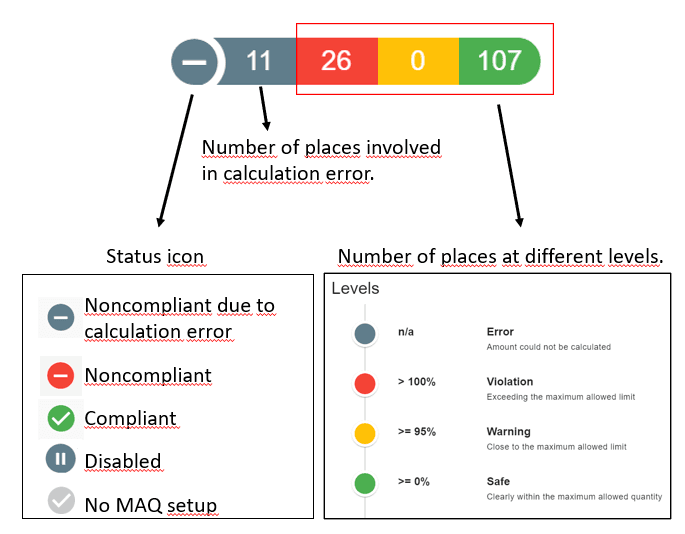
In the example above, 11 spaces cannot be fully calculated because of data errors, 26 spaces exceed the limit, none are in the warning band and 107 are safe. Because errors exist, the MAQ is shown as noncompliant due to calculation error until the missing data is fixed.
The status icon summarises the whole MAQ rule in one of five states: noncompliant due to calculation error, noncompliant, compliant, disabled, or no MAQ set up.
Clicking the badge opens the full MAQ compliance report, which groups every space into four levels:
| Level | Share of limit used | Meaning |
|---|---|---|
| Violation | More than 100% | The space exceeds the maximum allowed limit |
| Warning | 95% or more | The space is close to the maximum allowed limit (threshold adjustable) |
| Safe | 0% or more | The space is clearly within the maximum allowed quantity |
| Error | n/a | The amount could not be calculated, for example because of a missing quantity or unsupported unit |
Each row shows the space, the limit, the nominal and current quantity, the percentage used and the contributing chemicals. Missing densities are filled with an IFC-guided default of 1.2 g/cm³ and flagged as approximate (~), so data gaps are visible rather than hidden. Reports export to Excel for auditors and inspectors.
Alerts, floor plans and emergency access
- Notifications: a responsible user, usually the site or group safety officer, receives email alerts at the chosen level, with CC recipients and reminders every 7 days by default.
- Digital floor plans: MAQ status and percentage used are shown per laboratory on the floor plan.
- Emergency page: live hazard and quantity information can be shared with fire crews through emergency access tokens, even before they arrive on campus.
- Audit log: every change to an inventory item records the date, the old and new value and the user who made it.
On the digital floor plan, each laboratory is drawn as a highlighted space with its MAQ status marker, alongside safety markers such as fire extinguishers, fire alarms, first aid, defibrillators and emergency exits. Users can switch the Laboratory, Safety Marker, Asset, MAQ and Asset Information layers on or off, and print the plan for inspections or fire-service briefings.
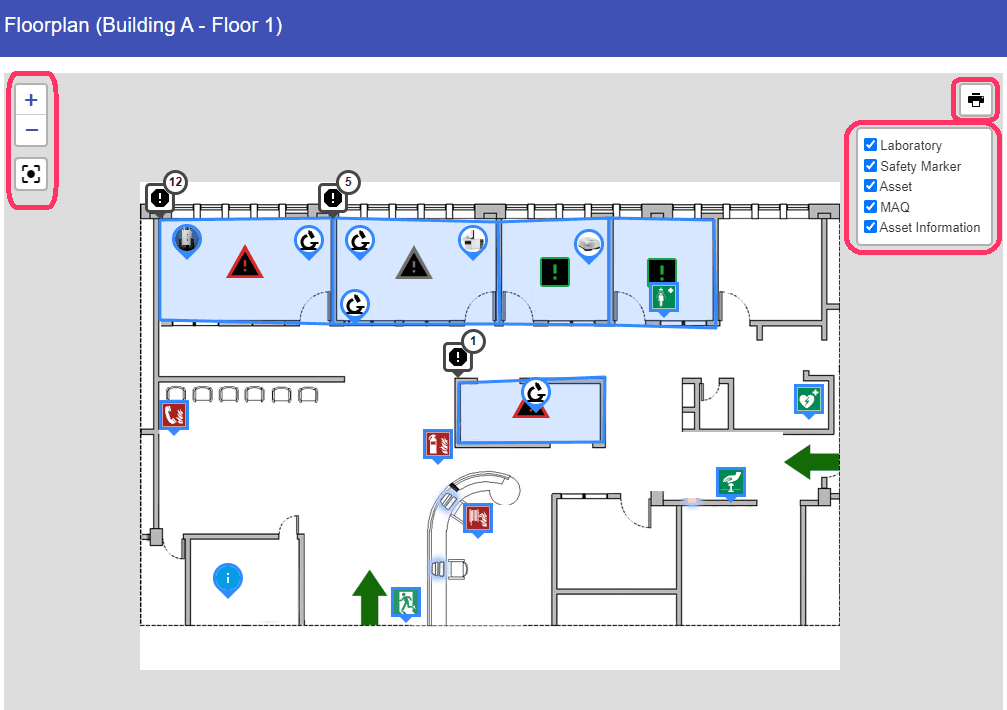
MAQ results are only as good as the inventory behind them. Labcup's stock-taking and reconciliation tools, and its error and warning lists, help teams keep that data validated.
Getting started: an MAQ compliance checklist
- Confirm which code applies to each building (IFC, NFPA, TRGS 510 or local rules) with your AHJ or fire engineer.
- Map buildings, floors, control areas, labs and storage locations, including area, volume and sprinkler status.
- Import existing spreadsheets into Labcup and barcode every container.
- Check that each item has a quantity, a unit, a physical state and, for liquids, a density.
- Enable the built-in IFC 2021 or TRGS MAQ templates and adjust them to your local limits.
- Assign a responsible safety officer and set the warning threshold and notifications.
- Resolve the errors and warnings listed in the first compliance report.
- Set up the Emergency page and share access with your local fire service.
- Schedule regular stock-taking so the inventory, and therefore the MAQ result, stays accurate.
Related resources
- Laboratory Safety module
- Emergency and Digital Floorplans module
- MAQ management (essential)
- MAQ management (advanced)
- Target Sets
- Control Areas
© 2026 Labcup Ltd. MAQ limits shown are for illustration; always confirm the limits that apply to your site with your local authority.
Frequently asked questions
- What does MAQ stand for?
- MAQ stands for Maximum Allowable Quantity: the most of a given hazardous-material class permitted in one control area or space under a fire or building code.
- What is a control area in a laboratory?
- A control area is a fire-rated compartment of a building inside which hazardous materials may be stored and used up to the MAQ. Codes limit how many control areas each floor may have.
- What happens if a lab exceeds its MAQ?
- It depends on the code. Under the IFC, the building no longer meets its occupancy classification: quantities must be reduced, protection such as sprinklers or approved cabinets added, or the space reclassified as a high-hazard (Group H) occupancy. Under TRGS 510, exceeding a threshold quantity means additional protective measures must be put in place.
- Is MAQ the same as a TRGS 510 threshold quantity?
- They are similar but not the same. Both cap the quantity of each hazard category in a defined area. An IFC MAQ applies per control area and, if exceeded, changes the building's occupancy classification. A TRGS 510 threshold quantity applies per enclosed operational building and, if exceeded, requires additional protective measures.
- Do sprinklers increase the MAQ?
- For many hazard classes in the IFC, yes. An approved automatic sprinkler system typically allows a 100% increase, and approved storage cabinets or safety cans allow another 100%. Some hazard classes are excluded, so check the footnotes of the IFC tables.
- Is MAQ the same in every country?
- No. The US and many other jurisdictions use IFC and NFPA MAQs per control area. Germany's TRGS 510 uses threshold quantities per enclosed operational building, with different consequences when they are exceeded. Local fire authorities and insurers may add stricter limits.
- How often should MAQs be calculated?
- Continuously, because quantities change daily. Labcup recalculates every enabled MAQ each night and on demand, rather than relying on an annual survey.
- Can Labcup calculate MAQs automatically?
- Yes. Labcup sums the quantity of every container in each hazard class and space and compares it with the limits you define. It shows the result as Violation, Warning, Safe or Error, alerts the responsible safety officer, and displays the status on digital floor plans and the Emergency page.
- Can Labcup monitor TRGS 510 threshold quantities?
- Yes. The feature is called MAQ in Labcup, but it monitors TRGS 510 threshold quantities in the same way. You set the TRGS threshold as the limit and apply it at building level, and Labcup tracks totals, warnings, reports and alerts just as it does for IFC MAQs.
- Who can configure MAQs in Labcup?
- Users with the MAQ admin permission, which is included by default in the Site Administrator and Site Safety Officer roles.
Read next
- How Boston-Area Labs Meet Massachusetts Fire Code Requirements: HMIS, MAQs, NFPA 704 Placards and Digital Floorplans from One Chemical Inventory
How Boston, Cambridge and Watertown laboratories keep HMIS, MAQ, NFPA 704 placard and emergency information current under 527 CMR 1.00 and NFPA 45 with a digital chemical inventory.
- What Is the Best Software for COSHH Risk Assessments? Why Labs Choose Labcup
Labcup is laboratory management software that creates COSHH risk assessment forms directly from your chemical inventory.
- Labcup vs. Excel: Why Labs Are Moving Off Spreadsheets for Inventory Management
What actually changes when a lab digitalizes its chemical, biological, and equipment inventory — and where spreadsheets stop being enough.
- What Is the Best Scalable Lab Inventory Software? Why Labcup Grows From One Lab to a Multi-Site Organisation
Labcup is a modular, cloud-based laboratory inventory system. Start small as a startup or research group, then grow to campus-wide and multi-site with statistics, reports and dashboards.
- Why Is PPE Management Important in the Lab, and Why Should It Be Linked to Your Chemical Inventory?
PPE only protects lab workers when it matches the specific chemical, is worn within its rated time and is replaced before it expires. Learn why PPE belongs alongside your chemical inventory, what OSHA and EU rules require, and how Labcup links PPE to every chemical.